
Options calculations are critical to maximizing covered call returns. The Elite version of the Ellman Calculator is an important tool in guiding us to making the best possible investment decisions. The Basic Ellman Calculator contains the following tabs:
- Intro
- Single tab
- Multiple tab
- “What now” tab
The Elite version contains these four tabs plus two more:
- “Unwind now” tab
- Schedule D
The “Unwind now” tab is explained in the following journal article:
/covered-call-writing-mid-contract-unwind-exit-strategy/
The purpose of this article is to explain the benefits of the Schedule D particularly for those trading outside of sheltered accounts. As you will see, a lot of time and effort has gone into the expanded version of the calculator.
Schedule D
In non-sheltered accounts, if you sold a stock or option, regardless of whether you made or lost money on it, you have to file Schedule D. This two-page form, with all its sections, columns and special computations, looks complicated and it certainly can be.
Your extra work will be greatly reduced by the Schedule D tab of the Elite Calculator. You will also be rewarded by tax savings. If you lost money, this form will help you use those losses to offset any gains or a portion of your ordinary income. And if you profited from your transactions, it will help ensure you don’t overpay the government for your gains.
When you make money on a sale, Schedule D requires you to report the transaction using some basic information, including when you bought the asset and when you sold it. This is critical, because how long you hold the property determines its tax rate.
If you owned the security for a year or less, any gain will cost you more in taxes. These short-term assets are taxed at the same rate as your regular income, which could be as high as 35 percent on your return. Short-term sales are reported in Part 1 of the form.
However, if you held the security for 366 days or more, it’s a long-term asset and is eligible for a lower capital gains rate — 15 percent or even zero percent, depending upon your income level. Sales of these assets are reported in Part 2 of the form.
Information required:
- Name of asset
- Date purchased
- Date sold
- Price sold
- Cost basis
- Gain/loss
The gain or loss that you enter is figured by subtracting your basis from the sales price.
Information tab
Figure 1 below shows the Schedule D information tab accessed by clicking on the icon highlighted by the red arrow:

Information tab of the Elite Calculator
Intro page
I have highlighted the following areas:
- Yellow-personal information to enter
- Green- user information
- Pink- six entry codes or different pages of the Schedule D specific for the type of trade
Covered call writers will use predominantly entry tabs D2, D3 and D4.
Entry tab D2
We use this entry code when we buy a stock, sell the call and our shares are assigned. In all entry tabs, information is entered in blue areas only as shown in figure 2:
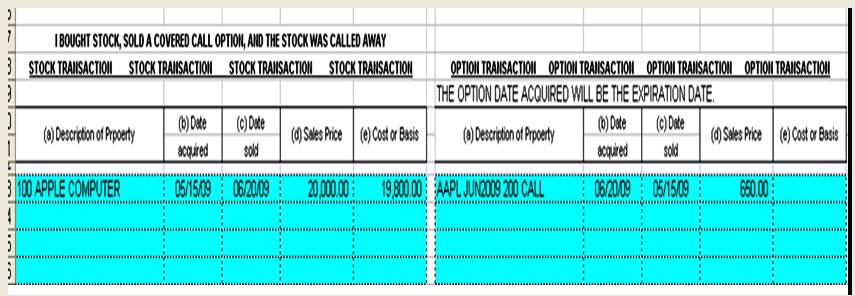
D2 Entry code
Entry tab D2- enter info
Figure 2
In this example, we bought AAPL for $200 and sold the $200 call for $650. The calculations will appear in the right side of the tab in the “white areas” Figure 3:

Entry code D2- results
Figure 3
The red-circled area shows a short-term profit of $650.
Entry tab D3
We use this code when we buy a stock, sell the option and then buy back the option. Once again, the information is entered in the blue areas as shown in figure 4:
 Entry tab D4- enter info
Figure 4
The calculations will appear in the white areas on the right side of the tab as displayed in figure 5:

D3 tab results
Entry tab D4- results
Figure 5
Since the option was sold for $650 and repurchased for $124, the spreadsheet shows a short-term capital gain of $526 (red circle).
Entry tab D4
We use this entry tab when we buy a stock, sell the call and the option expires worthless. The blue cells are filled in as shown in figure 6:
 Entry tab D4- enter info
Figure 6
Note that the option on line 1 was sold in 2009 while the option on the second line was sold in 2007. Next we view the calculations on the right side of the tab in the white areas (figure 7):
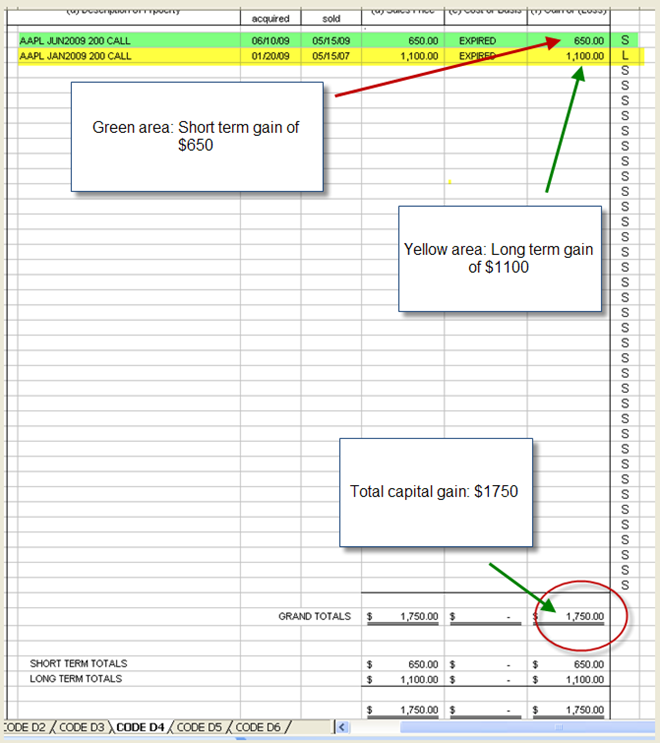
Option calculation results
Entry tab 4 results
Figure 7
The green area shows a short-term capital gain of $650 and the yellow area shows a long-term capital gain of $1100. The totals capital gain of $1750 (red circle) is broken down into short and long-term at the bottom of the page.
The other entry codes are for stocks or options only and not the combination of the two as we utilize for covered call writing. At the time of the penning of this book consideration was being given to expanding the Schedule D to include puts.
How to purchase the Elite Calculator:
The Elite Calculator is offered for FREE to premium members and available in the resource download section. Also available in this area is the 23-page user guide. General members can obtain the enhanced version of the calculator in the Blue Collar Store:
The calculator and user guide will be emailed directly to your computer.
The information gleaned from the Schedule D of the Elite Calculator should be used in consultation with your tax advisor.
Owen Sargent (outstanding CPA who helped develop the calculator) can be contacted @ (osargentcpa@aol.com) to answer any questions relating to the calculator or tax consequences from options trading.
Upcoming live events (details to follow):
- September 14, 2012: Paris Hotel, Las Vegas Nevada
- November 10, 2012: University Club, Chicago Illinois
- Spring 2013: Atlanta Georgia
- September 17, 2013: Philadelphia Pennsylvania
Market tone:
This was a light week for economic reports:
- New home sales declined 8.4% in June compared to May stats however 15% higher than a year ago
- New orders for durable goods rose 1.6% in June better than the 0.4% expected
- The first estimate of annual GDP in the 2nd quarter came in a 1.5%, down from the 2.0% reading of the 1st quarter but came in as anticipated
- Spending on services rose from 1.3% in the 1st quarter to 1.9% in the 2nd quarter
- Exports rose by 5.3% for the 3rd consecutive quarter
- Imports also rose from 3.1% to 6.0% causing a net negative GDP factor
For the week, the S&P 500 rose by 1.7% for a year-to-date return of 11.5% including dividends.
Summary:
IBD: Confirmed uptrend
BCI: Cautiously bullish favoring in-the-money strikes
Wishing you the best in investing,
Alan (alan@thebluecollarinvestor.com)

Premium Members,
The Weekly Report for 07-27-12 has been uploaded to the Premium Member website and is available for download.
Best,
Barry and The BCI Team
I had the elite calculator for a year and never realized what the D schedule was used for. thank you
Market orders vs. limit orders: Offsite Q&A:
Alan,
You stated you always place limit orders when selling call options. What if the the order does not get filled? I found that selling calls at market has worked for me. Can you enlighten me with your reasoning.
Best,
Richard
Hi Richard,
Placing limit orders on options puts you in the driver’s seat and will give you an opportunity to “negotiate” a better price. When you place a market order, the market maker or specialist is obligated to give you the best published price. That may or may not be the price you are anticipating. When you place a limit order, you are guaranteed the price you place or better, if executed. If it is not executed you can always change the order. This is all done within a minute or two. If the bid-ask spread is $0.15 or greater, we have an opportunity to “negotiate” a better price. This can only be done with limit orders. We don’t always accomplish this goal, but we can always change the order to the published price…nothing lost. You will find that negotiating a better price will add additional cash into your accounts for very little time and effort. Placing market orders will guarantee faster executions but will end up creating lost opportunities to enhance your results.
Alan
Alan,
EXPE gapped up on Friday after a strong earnings. The stock is on your list in bold. Is it a good idea to use this stock considering the recent price increase? Thanks a lot.
Jorge
Jorge,
I understand your concern regarding a stock that has gapped up so dramatically but I wouldn’t penalize or eliminate a stock because it has performed so well. I will, however, consider in-the-money strikes in case of profit-taking. First I wait for the initial volatility to subside by watching both price and volume (compare to average volume). Once settled, I would consider this equity an eligible stock for cc writing. When I checked a little while ago, EXPE was trading @ $55.52 and the $55 call could be sold for $2.45. That was result in a 3-week initial return of 3.5% and a (minimal)downside protection of that profit of 1%. This is basically a near-the-money strike.
Alan
Hi Alan
Hope you are going well with everything
Being in Australia, there is a many differences to the US market… I chose to invest in the US market due to the following reasons…
* Thousands of tradable stocks
*Brokerage is much MUCH cheaper
*Timezone difference allows me to be behind a computer when it matters
*There seems to be better available information on the US market…
The only potential downside that im trying to fully understand better is the exchange rates…
I know you have talked about dollar cost averaging before…
Can this be used to put money into the US succesfully? Should I attempt to time the moves using technical analysis?
Any thoughts here would be welcome?
Cheers Alan
Dave
Dave,
Like the stock market, there is no good way to “time” the currencies market. The best way to avoid the fickleness of the excange rates is to simply put money into a US dollar account when the exchange rate seems to be to your benefit, and use it to trade. When you feel the exchange rate coming back to AU dollars seems better you can return some of the profits back to your Australian accounts. Last time I checked OptionsXpress would accept foreign accounts, but that was pre-Schwab. Go online and ask them.
Dave,
Good to hear from you. Good advice from Owen.
For establishing accounts outside the US, look into the following:
• Charles Schwab/ Options Express
• Zecco
• TradeMonster
Keep in touch.
Alan
Running list stocks in the news: LL:
On July 25th Lumber Liquidators reported a stellar 2nd quarter earnings report with year-to-year earnings growth of 126.3% representing a 48.3% positive surprise. Net sales rose by 19.9% with a 5.8% increase in then number of customers. Both management and analysts have raised guidance as well. Long-term EPS growth is now projected @ 17.5%. Trailing ROE stands at an impressive 13.8% above the peer group average of 12.9%. Share price has been trading above the 50-d SMA since February. Our premium watch list shows an industry segment rank of “B” and a beta of 1.39.
Alan
Alan,
Do we need to subscribe to the IBD Monday paper if we are premium members? Keep up the good work and thanks.
Harvey
Harvey,
If your objective is to use the IBD Monday edition for covered call screening only and you are a premium member, you do NOT need to subscribe. However, the publication does have many interesting articles and commentary that may be of interest to our members. For screening using the BCI methodology, we do all the work for you so you will not need to purchase the paper..
Alan
Thanks for the advice Alan and Owen…
Very good ideas there…
One last question…
What would one expect to make on an annual basis in the stock market (on average)? 10%, 12% 15%??
Cheers
Dave
Dave,
Results will vary for so many reasons on so many levels. The Blue Collar Investor provides a weekly list of stocks that have gone through our multi-level screening process and meet our demanding system criteria. However, our subscribers then select the stocks that meet their specific criteria and match their own financial situation and risk profile. Since there are thousands of possible combinations of stock selection, strike prices, holding periods, etc., it is very difficult to come up with a published expected return Our GOAL is to generate 2% to 4% per month under normal market conditions.
Alan
Running list stocks in the news: PII:
PII, maker of all-terrain vehicles, recently returned to our premium watch list. On July 24th, it reported a stellar 21st positive earnings surprise. Earnings increased by 43% year-to-year and revenues rose by 24%. Guidance was raised for 2012 sales growth to 14-17% from 10-13%. All 10 analysts also raised guidance to an annualized growth of 30.6% for 2012 and 19.2% for 2013. This was also the 17th consecutive year of dividend increase. PII has a 1-year Return on Equity of 49.4% compared to its industry peers of 21.9%. Our premium watch list shows an industry segment rank of “B”, a beta of 1.26 and a % dividend yield of 1.90.
Alan
I lost all data on my computer and am reconstucting my favorites. I seem to remember a comment on how to save the chart settings on stockcharts.com. I can’t seem to find it though. Can anyone help me out with that?
Thanks,
Bill P.
Hi Bill,
Glad to help.
Here’s what I did to save presets:
Set up a chart with any equity as shown on page 85 of “Cashing in on Covered Calls” or pages 71-74 of “Encyclopedia for Covered Call Writing”. Once set up, copy and paste the URL to “favorites” and name it (Stockcharts presets). Every time you access that link your chart will be set up and simply type in the ticker (upper left side) for the stock in question.
Alan
Premium members:
This week’s 6-page report of top-performing ETFs and analysis of ALL Select Sector Components has been uploaded to your premium site.
For your convenience, here is the link to login to the premium site:
https://www.thebluecollarinvestor.com/member/login.php
Not a premium member? Check out this link:
https://www.thebluecollarinvestor.com/membership.shtml
Alan and the BCI team